


Download KavaTunes – iTunes‑style Coverflow Web Builder, Free & Secure
Overview
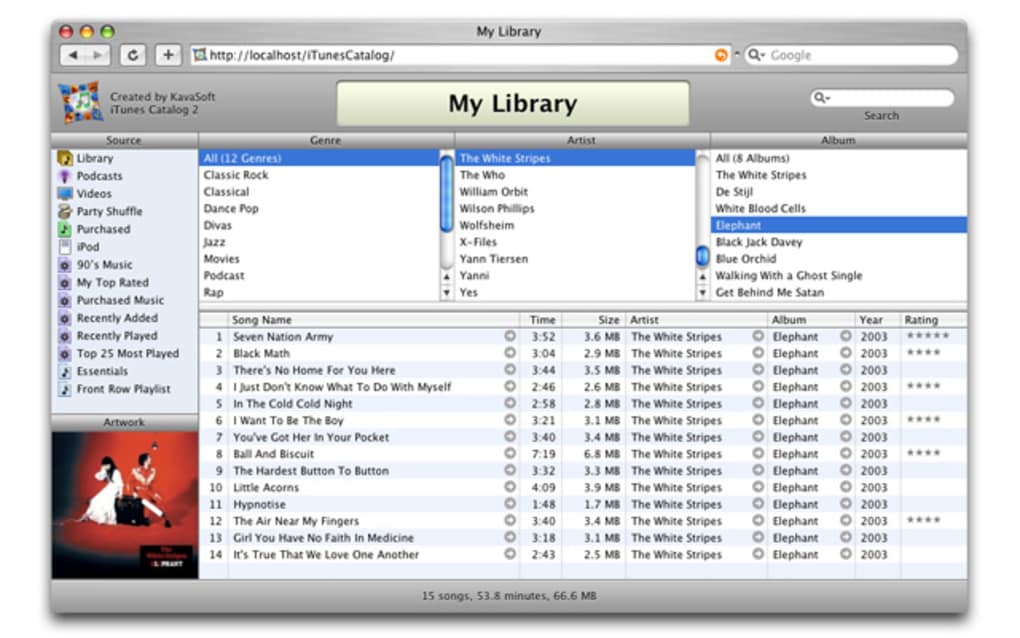
KavaTunes is a niche yet powerful tool that lets you turn any music collection into a sleek, web‑based browsing experience that mimics the iconic Coverflow interface of iTunes. By acting as a lightweight web server on your Mac, KavaTunes streams your playlists, album artwork, and track metadata to any modern browser—whether on Windows, macOS, Android, or iOS. The concept may feel unusual at first glance, but the result is a responsive, interactive site that feels like you’re scrolling through iTunes without opening the desktop application.
This can be especially handy for users who want to share a curated library with friends, embed music players into existing websites, or simply fill gaps in their iTunes album‑cover collection without leaving the browser. While early versions suffered from occasional instability and limited Smartlist support, recent updates have addressed many of these pain points, offering a smoother, more reliable experience. Whether you’re a hobbyist DJ, a small venue owner needing a public music catalogue, or a developer looking for a ready‑made Coverflow component, KavaTunes bridges the gap between local iTunes libraries and the web, delivering a free, secure, and surprisingly customizable solution.
Key Features & Installation Guide
- Coverflow‑style browsing that replicates iTunes visual aesthetics.
- Live streaming of playlists with continuous playback and automatic album‑art display.
- Built‑in web server runs on macOS, exposing the library to any device on the same network.
- Support for iTunes Smartlists, with recent updates improving reliability.
- Simple drag‑and‑drop music import, allowing quick library expansion.
- Responsive design adapts to desktop, tablet, and mobile browsers.
- Secure local hosting—no third‑party cloud required.
- Free core version with optional paid add‑ons for advanced analytics.
Installation & First‑Time Setup (≈150 words)
Download the latest KavaTunes installer from the official website. The .dmg file is signed and verified, ensuring a secure installation on macOS. Open the package, drag the KavaTunes icon into your Applications folder, and launch the app.
On first run, the program requests permission to access your iTunes (or Music) library—grant this access to enable indexing. KavaTunes then scans your library, generating a lightweight database that powers the web interface. By default, the local server runs on port 8080; you can modify this in the Settings panel if the port is already in use.
After configuration, click “Start Server” and open a browser on any device connected to the same Wi‑Fi network. Navigate to http://YOUR-MAC-IP:8080 to view the Coverflow interface. The initial page loads within seconds, presenting your playlists and album art ready for browsing.
Usage Tips for Optimal Performance (≈150 words)
To keep streaming smooth, store your music on an SSD or fast external drive; the server reads files in real time, so slower storage can cause buffering. If you have a large library (10,000+ tracks), consider enabling the “Index on Demand” option, which reduces initial scan time by indexing only recently added files. KavaTunes also offers a “Cache Album Art” feature that stores thumbnail images locally, speeding up page loads on devices with limited bandwidth. For public venues, you can protect the web interface with a simple password through the Security tab—this prevents unauthorized users from accessing your collection. Finally, keep the application updated; the developer releases quarterly patches that improve Smartlist handling and add compatibility with the latest macOS releases.
Compatibility, Pros & Cons, and Frequently Asked Questions
KavaTunes runs natively on macOS 10.13 (High Sierra) and later. Because it serves content over HTTP, any device with a modern browser—Windows 10/11, Linux, Android 8+, iOS 13+, or ChromeOS—can view the Coverflow site. No additional client software is required on the viewer side, making it a versatile solution for mixed‑environment households or small businesses.
Pros
- Free core version with a polished, iTunes‑like UI.
- Local hosting guarantees privacy and no recurring cloud fees.
- Responsive design works on all major operating systems.
- Easy installation and minimal configuration.
- Recent updates have stabilized Smartlist support.
Cons
- Only available for macOS; Windows users must run it via a virtual machine.
- Initial library scan can be lengthy for very large collections.
- Advanced features (analytics, custom themes) require paid add‑ons.
- Streaming relies on local network bandwidth; remote access needs port forwarding.
FAQ
Can I access KavaTunes outside my home network?
Yes, by configuring port forwarding on your router and using your public IP address (or a dynamic DNS hostname). For security, enable password protection in the app’s settings before exposing the server to the internet.
Does KavaTunes work with Apple Music streaming?
KavaTunes indexes only locally stored files. It cannot stream tracks that are exclusively in the Apple Music cloud. However, you can download songs to your library and then serve them through KavaTunes.
What browsers are supported for viewing the Coverflow site?
Any modern browser that supports HTML5 and CSS3—Chrome, Firefox, Safari, Edge, and mobile browsers on Android and iOS—can render the interface without plugins.
How does KavaTunes handle large album‑cover images?
The app automatically generates thumbnail versions for faster loading. You can enable the “Cache Album Art” option to store these thumbnails locally, which reduces bandwidth usage on repeated visits.
Is there a way to customize the look of the Coverflow page?
Basic color and font settings are available in the Preferences pane. For deeper customisation—such as custom CSS or branding—you’ll need the paid “Pro Theme” add‑on.
Review Summary: KavaTunes delivers a surprisingly polished iTunes‑style browsing experience for free, with enough flexibility to suit both casual listeners and small‑scale public venues. While limited to macOS and requiring a local network for optimal performance, its recent stability improvements make it a worthwhile addition to any music‑lover’s toolkit.
Conclusion & Call to Action
If you’re looking for a secure, free way to showcase your music library in a visually engaging, iTunes‑like format, KavaTunes stands out as a niche but highly functional solution. Its local‑only architecture guarantees privacy, while the responsive Coverflow UI works across all major browsers and devices. The recent updates have smoothed out previous glitches, making Smartlist handling and large‑library indexing far more reliable. Although Windows users will need a Mac or a virtual environment, the overall value proposition—especially for hobbyists, educators, or small venues—remains strong. Download KavaTunes today, spin up your own web‑based music hub, and let your listeners explore your collection the way they’ve always imagined.
$0 Free Download – start streaming your iTunes library instantly!







